


Oren Eini

CEO of RavenDB

a NoSQL Open Source Document Database

Get in touch with me:

oren@ravendb.net +972 52-548-6969

Posts: 7,618
|
Comments: 51,247
Privacy Policy · Terms
filter by tags archive
time to read 3 min | 441 words

When building AI Agents, one of the challenges you have to deal with is the sheer amount of data that the agent may need to go through. A natural way to deal with that is not to hand the information directly to the model, but rather allow it to query for the information as it sees fit.

For example, in the case of a human resource assistant, we may want to expose the employer’s policies to the agent, so it can answer questions such as “What is the required holiday request time?”.

We can do that easily enough using the following agent-query mechanism:

If the agent needs to answer a question about a policy, it can use this tool to get the policies and find out what the answer is.

That works if you are a mom & pop shop, but what happens if you happen to be a big organization, with policies on everything from requesting time off to bringing your own device to modern slavery prohibition? Calling this tool is going to give all those policies to the model?

That is going to be incredibly expensive, since you have to burn through a lot of tokens that are simply not relevant to the problem at hand.

The next step is not to return all of the policies and filter them. We can do that using vector search and utilize the model’s understanding of the data to help us find exactly what we want.

That is much better, but a search for “confidentiality contract” will get you the Non-Disclosure Agreement as well as the processes for hiring a new employee when their current employer isn’t aware they are looking, etc.

That can still be a lot of text to go through. It isn’t as much as everything, but still a pretty heavy weight.

A nice alternative to this is to break it into two separate operations, as you can see below:
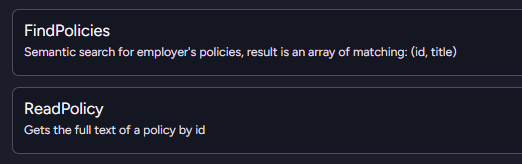
The model will first run the FindPolicies query to get the list of potential policies. It can then decide, based on their titles, which ones it is actually interested in reading the full text of.

You need to perform two tool calls in this case, but it actually ends up being both faster and cheaper in the end.

This is a surprisingly elegant solution, because it matches roughly how people think. No one is going to read a dozen books cover to cover to answer a question. We continuously narrow our scope until we find enough information to answer.

This approach gives your AI model the same capability to narrowly target the information it needs to answer the user’s query efficiently and quickly.
time to read 3 min | 445 words

When using an AI model, one of the things that you need to pay attention to is the number of tokens you send to the model. They literally cost you money, so you have to balance the amount of data you send to the model against how much of it is relevant to what you want it to do.

That is especially important when you are building generic agents, which may be assigned a bunch of different tasks. The classic example is the human resources assistant, which may be tasked with checking your vacation days balance or called upon to get the current number of overtime hours that an employee has worked this month.

Let’s assume that we want to provide the model with a bit of context. We want to give the model all the recent HR tickets by the current employee. These can range from onboarding tasks to filling out the yearly evaluation, etc.

That sounds like it can give the model a big hand in understanding the state of the employee and what they want. Of course, that assumes the user is going to ask a question related to those issues.

What if they ask about the date of the next bank holiday? If we just unconditionally fed all the data to the model preemptively, that would be:

  • Quite confusing to the model, since it will have to sift through a lot of irrelevant data.
  • Pretty expensive, since we’re going to send a lot of data (and pay for it) to the model, which then has to ignore it.
  • Compounding effect as the user & the model keep the conversation going, with all this unneeded information weighing everything down.

A nice trick that can really help is to not expose the data directly, but rather provide it to the model as a set of actions it can invoke. In other words, when defining the agent, I don’t bother providing it with all the data it needs.

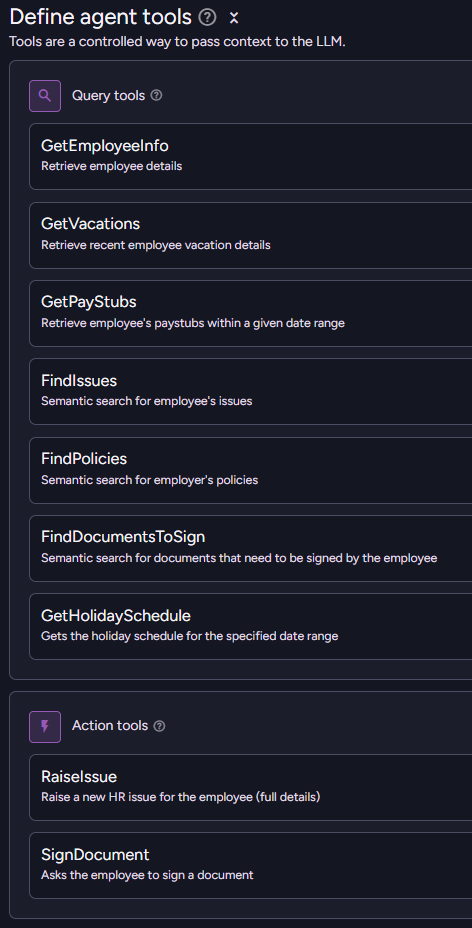
Rather, I provide the model a way to access the data. Here is what this looks like in RavenDB:

The agent is provided with a bunch of queries that it can call to find out various interesting details about the current employee. The end result is that the model will invoke those queries to get just the information it wants.

The overall number of tokens that we are going to consume will be greatly reduced, while the ability of the model to actually access relevant information is enhanced. We don’t need to go through stuff we don’t care about, after all.

This approach gives you a very focused model for the task at hand, and it is easy to extend the agent with additional information-retrieval capabilities.

time to read 3 min | 504 words

Building an AI Agent in RavenDB is very much like defining a class, you define all the things that it can do, the initial prompt to the AI model, and you specify which parameters the agent requires. Like a class, you can create an instance of an AI agent by starting a new conversation with it. Each conversation is a separate instance of the agent, with different parameters, an initial user prompt, and its own history.

Here is a simple example of a non-trivial agent. For the purpose of this post, I want to focus on the parameters that we pass to the model.


var agent = new AiAgentConfiguration(
"shopping assistant", 
config.ConnectionStringName,
"You are an AI agent of an online shop...")
{
    Parameters =
    [ 
       new AiAgentParameter("lang", 
"The language the model should respond with."),
        new AiAgentParameter("currency", "Preferred currency for the user"),
        new AiAgentParameter("customerId", null, sendToModel: false),
    ],
    Queries = [ /* redacted... */ ],
    Actions = [ /* redacted... */ ],
};

As you can see in the configuration, we define the lang and currency parameters as standard agent parameters. These are defined with a description for the model and are passed to the model when we create a new conversation.

But what about the customerId parameter? It is marked as sendToModel: false. What is the point of that? To understand this, you need to know a bit more about how RavenDB deals with the model, conversations, and memory.

Each conversation with the model is recorded using a conversation document, and part of this includes the parameters you pass to the conversation when you create it. In this case, we don’t need to pass the customerId parameter to the model; it doesn’t hold any meaning for the model and would just waste tokens.

The key is that you can query based on those parameters. For example, if you want to get all the conversations for a particular customer (to show them their conversation history), you can use the following query:


from "@conversations" 
where Parameters.customerId = $customerId

This is also very useful when you have data that you genuinely don’t want to expose to the model but still want to attach to the conversation. You can set up a query that the model may call to get the most recent orders for a customer, and RavenDB will do that (using customerId) without letting the model actually see that value.

time to read 1 min | 98 words

The RavenDB team will be at Microsoft Ignite in San Francisco next week, as will be yours truly in person 🙂. We are going to show off RavenDB and its features both new and old.

I'll be hosting a session demonstrating how to build powerful AI Agents using RavenDB.I’ll show practical examples and the features that make RavenDB suitable for AI-driven applications.

If you're at Microsoft Ignite or in the San Francisco area next week, I'd like to meet up.Feel free to reach out to discuss RavenDB, AI, architecture or anything else.

FUTURE POSTS

No future posts left, oh my!

RECENT SERIES

  1. Recording (20):
    05 Dec 2025 - Build AI that understands your business
  2. Webinar (8):
    16 Sep 2025 - Building AI Agents in RavenDB
  3. RavenDB 7.1 (7):
    11 Jul 2025 - The Gen AI release
  4. Production postmorterm (2):
    11 Jun 2025 - The rookie server's untimely promotion
  5. RavenDB News (2):
    02 May 2025 - May 2025
View all series

Syndication

Main feed ... ...
Comments feed   ... ...
}